
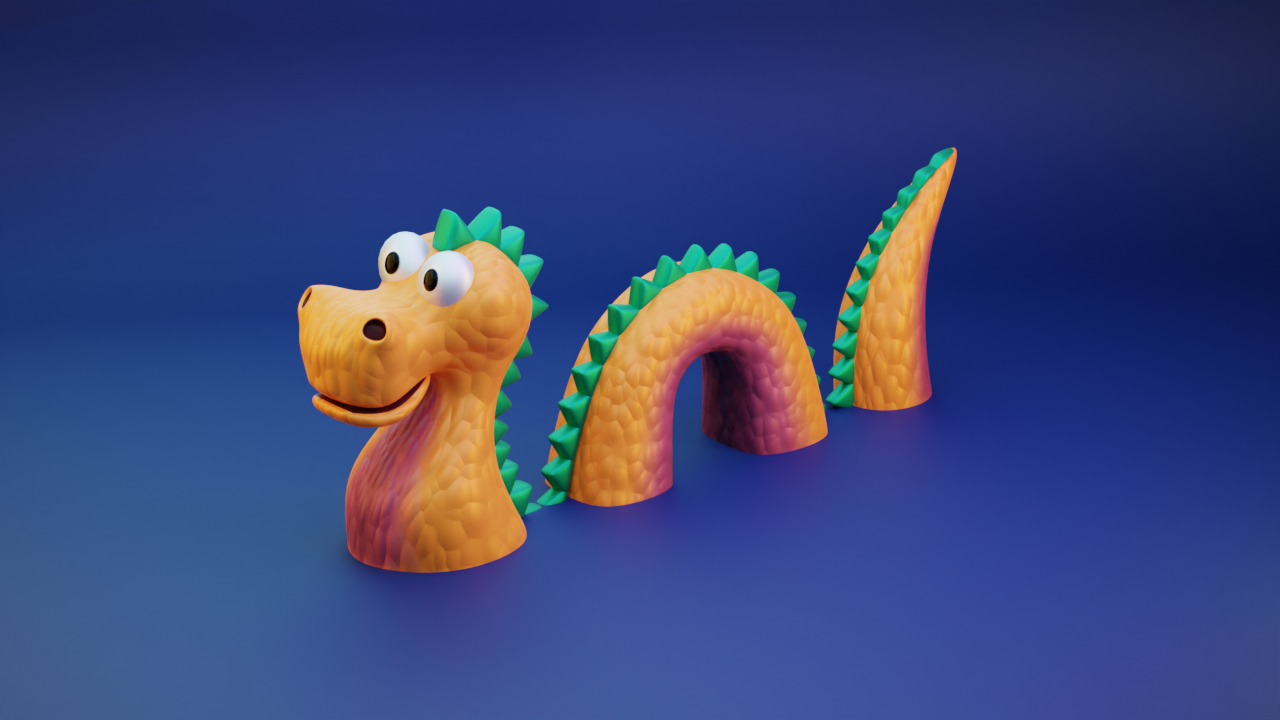
Here’s a short workflow timelapse creating this stylized dragon snake. Feel free to download the original Blender file.
About This Project
This stylized dragon snake was created as a low-poly fantasy creature featuring:
- Serpentine body: Segmented body with smooth curves
- Dragon features: Wings, horns, tail spikes
- Stylized proportions: Cute, approachable design
- Color scheme: Vibrant green with orange accents
- Animation-ready: Proper rigging for game use
Modeling Workflow
Phase 1: Body Base (25 minutes)
- Create a curve object for the body path
- Use array modifier with empty for segmentation
- Add bevel for smooth edges
Phase 2: Dragon Features (40 minutes)
- Model head from sphere and cone combinations
- Create wings using simple planes with edge loops
- Add horns, spikes, and tail details
Phase 3: Materials & Rigging (35 minutes)
- Apply vertex colors for pattern variation
- Set up basic bone rig for animation
- Configure camera angle and lighting
Download the Blender File
📥 Download dragonsnake.blend (8 MB)
The file includes:
- All models with proper naming conventions
- Materials and lighting setup
- Basic armature for animation
- Render settings optimized for Cycles
Tips for Low-Poly Creatures
Body Segmentation
Create smooth, segmented bodies efficiently:
- Use a Curve object as the body path
- Apply an Array modifier with duplicate offset
- Add a Bevel modifier for rounded edges
- Use Proportional Editing to shape the curve
Optimization Targets
| Element | Target Polygons |
|---|---|
| Body segment | 16-32 tris |
| Head | 50-100 tris |
| Wing (each) | 20-40 tris |
| Horn/Spikes | 8-16 tris each |
Related Resources
- Best Blender to Unity Export Settings – Optimize your workflow
- Low-Poly Forest Environment – Similar tutorial with free blend file
- Stylized Barrel Modeling Timelapse – Another stylized asset tutorial
Enjoy creating with this free blend file! Share your own creature designs on social media and tag us. 🐉✨